
WordPress ERP integration is an architectural process that requires precise planning of data flow between the front-end (store) and back-end (resource management system). In e-commerce environments where transaction volumes grow, scattering data across systems leads to asynchronicity errors, a lack of information consistency, and billing issues.
Instead of treating the connection of a website with an ERP system as an optional add-on, it should be approached as building a central data bus. In this article, based on the architecture implemented within our own SolutionsInc structures (connecting WooCommerce with ERPNext), we discuss key technical challenges: managing a Single Source of Truth (SSOT), webhook security, and SLA guarantees. A well-designed WordPress ERP integration solves these problems at their core.
Single Source of Truth (SSOT): How to Avoid Data Conflicts?
The most common mistake when implementing Enterprise-class systems is attempting to maintain two-way synchronisation of absolutely all records. This results in a “race condition”. What happens when an administrator changes a product price in WordPress, and in the exact same second, an accounts clerk updates the pricing in the ERP system? Which database is right?
The solution is to strictly define the SSOT (Single Source of Truth) for individual data entities. In our recommended architecture, WordPress ERP integration relies on a clear division of roles:
- WooCommerce manages the product: WordPress is the single source of truth for product descriptions, attributes, images, and, most importantly, retail prices. The online store is the sales front where promotional rules and discounts operate.
- ERPNext manages post-transaction logic: The ERP system is used exclusively for invoicing after a purchase is made and for managing real-time inventory levels.
With this approach, when a customer places an order, WordPress sends a complete payload with the final transaction price to the ERP system. ERPNext does not verify its own pricing – it accepts the value from the e-commerce platform as an absolute certainty for a given transaction and generates an accounting document based on it. The risk of minor discrepancy errors on invoices, resulting from different VAT rounding algorithms in both systems, completely disappears.
API Security Management and GDPR Compliance
In 2026, merely having an SSL certificate on a website is not a selling point – it is a basic technical standard. The real security challenges faced by every WordPress ERP integration lie in the communication authorisation layer and the protection of Personally Identifiable Information (PII).
Transferring customer data (name, surname, address, shopping basket) between the store’s server and the ERP system is subject to strict GDPR regulations. How do we solve this problem technically?
- API Token Management: Communication should never rely on static, time-unlimited keys (Long-Lived Tokens) pasted directly into the WordPress plugin code. We utilise rotating access tokens with limited permissions (Scope-Based Access). The token used by WooCommerce to create orders in ERPNext has write-only permissions for the Sales Order table – it cannot read the company’s financial data.
- Webhook Signature Verification: When ERPNext sends feedback to WordPress (e.g., “Invoice generated, update order status”), WordPress must know that the request actually comes from our ERP, and not from a network scanner. We achieve this through HMAC (Hash-based Message Authentication Code) – a cryptographic signature in the HTTP request header.
- Data Minimisation: In the API payload, we transmit only the personal data absolutely necessary to issue an invoice and dispatch the parcel.

WordPress ERP Integration in Practice: Our Test Environment
We do not base our solutions on theoretical assumptions or other people’s “case studies”. Before we offer an architecture to external clients, our WordPress ERP integration is rigorously tested and implemented on our own “living organism” – the websites and internal software of SolutionsInc.
Connecting ticket management via SolutionsWeb and deployment management through SolutionsERP, we had to create a reliable information workflow. Every contact form enquiry, every fault reported by a client, and every service purchase are processed asynchronously between our front-end servers and the ERPNext instance.
Why do we use n8n as a middleware layer?
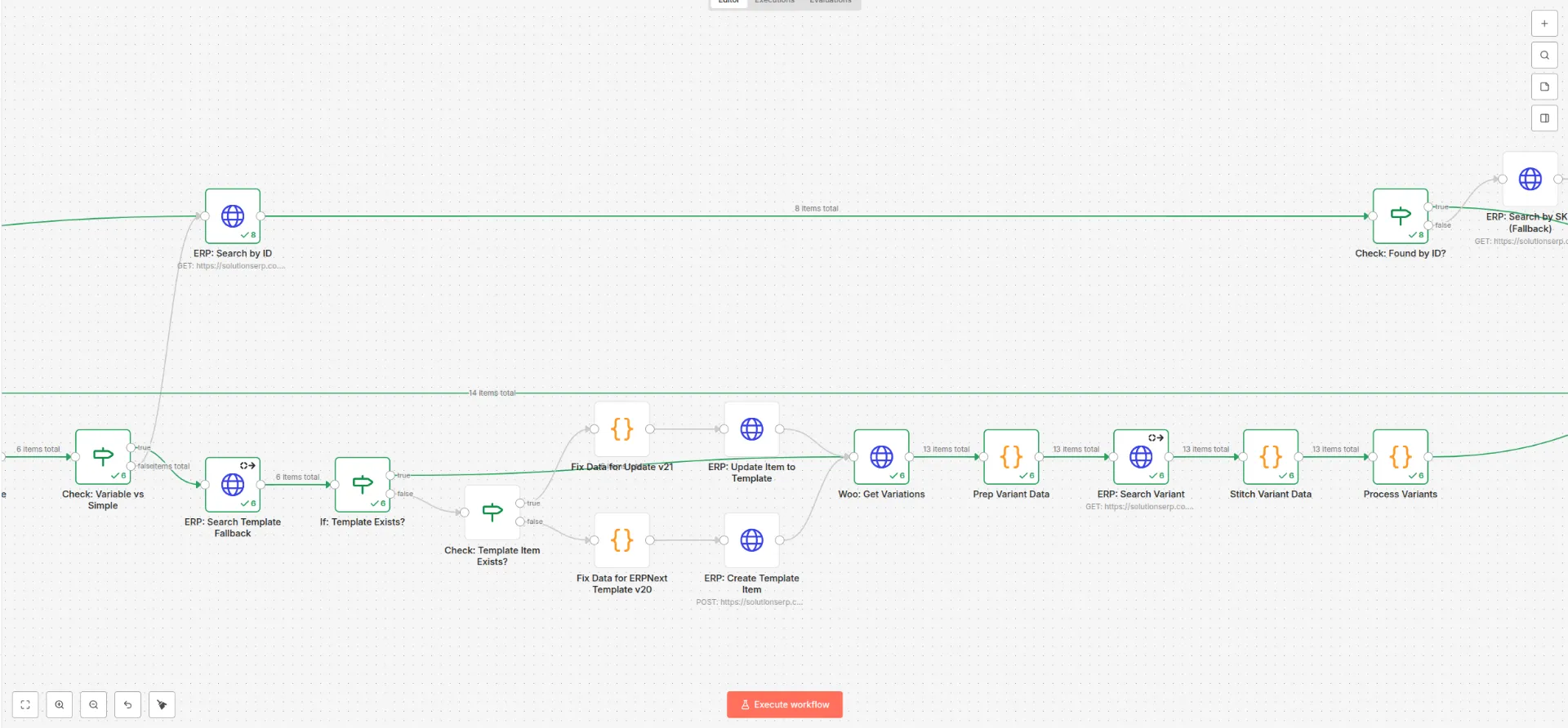
Instead of writing rigid point-to-point integrations (directly from WordPress PHP to Python/Frappe in ERPNext), we opted for a middleware layer in the form of n8n.
This gives us full control over query queues. If the ERP instance is being updated and returns a 503 error for 5 minutes, a standard WordPress plugin will simply “lose” the customer’s order. In our architecture, n8n receives the webhook from WordPress, stores it, and implements an Exponential Backoff mechanism (retrying requests with increasing delays) until the ERP is ready to accept data again.
Service Level Agreement (SLA) and Business Data Integrity
For a business client, the underlying technical stack is secondary – what matters is the Service Level Agreement (SLA) and the certainty that company processes will not grind to a halt during Black Friday or a sudden spike in popularity.
An efficient WordPress ERP integration must be based on asynchronicity. When a customer clicks “Buy and pay”, WordPress should not wait for a response from the ERP server to display the thank-you page. Such synchronous waiting drastically reduces the Time to First Byte (TTFB) and risks dropping the session entirely.
Our architecture separates these processes. WordPress immediately completes the transaction and queues the task in the background. This guarantees a high SLA for the e-commerce platform itself. Data integrity is secured by transaction logs at the middleware layer (n8n), allowing for full auditing – if a document is not generated, the technical log will precisely indicate at which stage the parser rejected the data payload (e.g., due to an invalid postcode format).
Implement a Stable E-commerce Architecture with SolutionsInc
Automation is not a collection of marketing buzzwords about “saving time”; it is the implementation of specific engineering mechanisms: data validation, queue management, and cryptographic security of communication between servers.
A well-thought-out WordPress ERP integration lifts the burden of monitoring data consistency off your team’s shoulders. As the team responsible for developing SolutionsERP, we know the Frappe and ERPNext environment inside out, and our experience with SolutionsWeb allows us to optimise API queries from the WordPress side so that they do not overload your store’s database.
If your business has reached a stage where manually transferring data from WooCommerce to accounting generates errors, and current synchronisation plugins cannot cope with a complex pricing and variant structure – get in touch to discuss implementing a dedicated data bus.
Leave a Reply